
Ziperase Device Link for Macs
Certified Automated Erasure & Testing for MacBooks, Macs (Mini, Studio, Pro) & iMac.
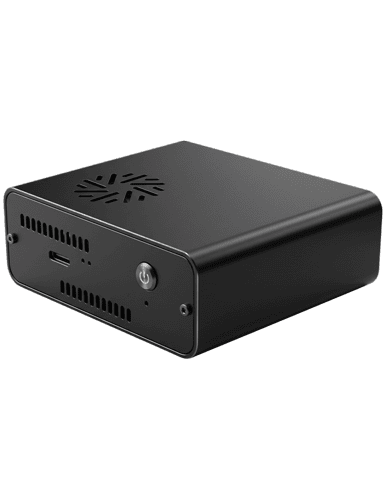

Streamline Your Mac Refurbishment Workflow
Take every Mac from intake to ready for resale or reuse in one automated sequence. Device Link combines certified Mac data erasure, a fresh macOS install and R2v3 hardware testing, all following official Apple security practices.
Why Macs Slow Down a Refurbishment Line
Macs reach the bench in mixed batches from corporate refreshes, lease returns and trade-ins, with Apple silicon, T2 and older Intel models side by side. Each chip generation boots and erases differently, so one line splits into parallel processes, and every one of them depends on a technician with Apple know-how. Reinstalling macOS by hand then ties that technician to a single unit at a time. A Mac that arrives with Activation Lock enabled is dead stock, and discovering it late wastes the bench time already spent. Units that do get through a manual wipe leave with no certificate, so the corporate customer has no evidence that their data is gone. The backlog grows, and high-value machines sit waiting for the few people qualified to process them.
Ziperase Device Link for Macs holds ADISA Product Claims Test certification and is independently tested by the UK's leading data sanitization laboratory.

What Automated Mac Processing Recovers
- Higher Bench Output: Erasure, macOS reinstall and hardware testing run as one automated sequence, so more Macs are ready for sale by the end of every shift.
- Flexible Staffing: On-screen prompts guide the operator through each step, so any technician on the floor can process Macs.
Protected Resale Value: Hardware test results, battery health and your own cosmetic grade are recorded for each Mac, so every unit is priced on documented condition. - Audit-Ready Evidence: Every erased Mac produces a tamper-proof, digitally signed certificate that your customer can hand straight to an auditor.
- Confident Buyers: Sharing the test record with the buyer gives proof of condition at the sale and a clear answer to any question afterward.

Compliant


Apple Silicon & Intel Compatibility
macOS Versions
- macOS 11 Big Sur through macOS 27 Golden Gate
Mac Models
- MacBook Pro
- MacBook Air
- Mac Mini
- Mac Studio
- Mac Pro
- iMac
Intel Processors
- T1
- T2
- Legacy
Apple Silicon
- M1 through M6
Activation Lock Verification & macOS Reinstall
Device Link verifies the lock status of every Mac and can return each cleared unit with a fresh copy of macOS.
- Activation Lock Verification: Each Mac is checked for firmware and Activation Lock at the start of the sequence. A locked unit stops the process and its lock status is recorded in the report, so bench time goes only to Macs that can be reused or resold.
- macOS Reinstall: After erasure, Device Link installs macOS from the USB install media included with the station and leaves the Mac at Apple’s first-setup screen, ready for its next owner. Where a reinstall is not required, the Recovery Hardware Test sequence skips the install and brings the cycle down to about 7 minutes.
For iPhones and iPads, Ziperase Mobile Erase runs Activation Lock detection before devices enter processing.
Ziperase Mobile Erase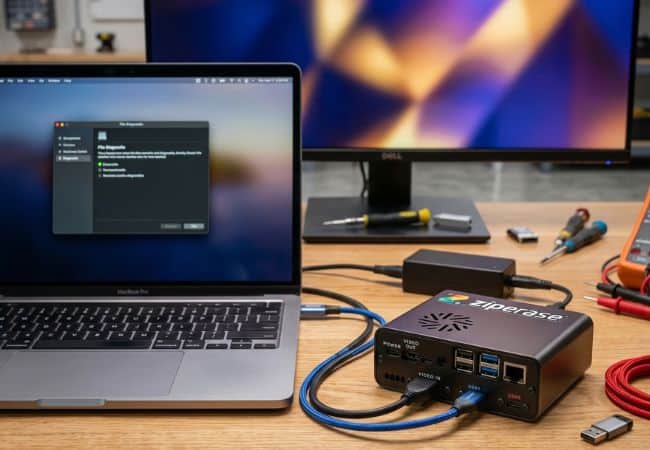
R2v3-Compliant Hardware Testing
Every Mac leaves the bench with a tested, documented condition. Device Link runs R2v3 Mac hardware testing as part of the sequence, guiding the operator through each component and recording the result:
- Keyboard
- Trackpad
- Screen
- Webcam
- Microphone
- Speakers
- Battery
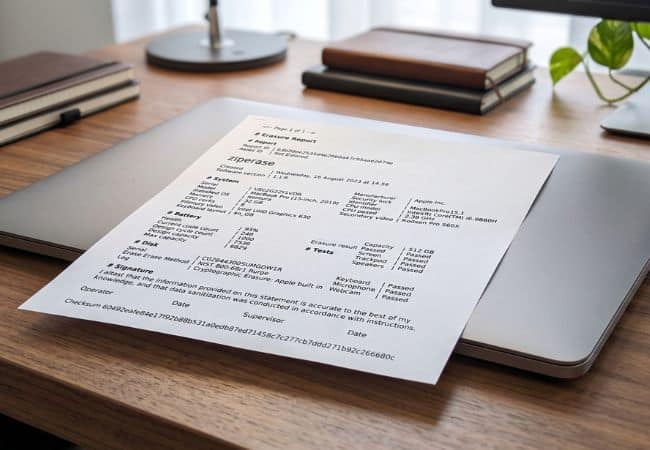
Each result appears on the Mac’s erasure certificate, alongside battery health and system information.
Erasure CertificateAutomated, Patented Technology
Device Link automates the erasure and testing process with exclusive patented technology. No specialized knowledge or extensive training is required, ensuring secure data sanitization with minimal operator interaction. With just a few clicks, your device is securely erased with all system information collected and collated in a tamper-proof erasure certificate.
Get a Demo
Certified Mac Erasure
Device Link’s Mac erasure is independently tested by ADISA, confirming that erased data is permanently gone. Every erasure follows official Apple security practices, and the erase method, the result and the full device details are recorded on a tamper-proof, digitally signed certificate for your auditors and customers.
- Certifications: ADISA Product Claims Level 4
- Standards: NIST SP 800-88 R2 and IEEE 2883:2022 for erasure, R2v3 for hardware testing and e-Stewards for battery testing
- Regulatory Frameworks: Supports data disposal requirements worldwide, including GDPR, UK GDPR, HIPAA, PCI DSS, FERPA, Australia’s Privacy Act and Singapore’s PDPA
Integrations & Compatibility
Every Mac you process is on record in one place, ready to feed the systems you already run.
- Ziperase Customer Portal: Reports from every Device Link station sync to the Portal automatically and can be separated by group within your organization.
- REST API: Pull reports from the Portal into your ERP and other internal systems through the REST API.
- Device Link for Chromebooks: The same station can be set up to process Chromebooks with Device Link for Chromebooks.
Device Link for Macs FAQs
Q: Which Mac models does Ziperase Device Link support?
A: Device Link supports MacBook Pro, MacBook Air, Mac Mini, Mac Studio, Mac Pro and iMac.
Q: Does Ziperase Device Link work with both Apple Silicon and Intel Macs?
A: Yes. Device Link processes Apple silicon Macs (M1 through M6) and Intel Macs (T1, T2 and Legacy) on the same station.
Q: How does Ziperase Device Link handle Activation Lock?
A: Device Link checks every Mac for firmware and Activation Lock at the start of the sequence. If a lock is found, the process stops and the lock status is recorded in that Mac’s report. A locked Mac cannot continue until the lock is released.
Q: Does Ziperase Device Link reinstall macOS after erasure?
A: Yes. Device Link installs macOS from the USB install media included with the station, then leaves the Mac at Apple’s first-setup screen with no user accounts. It supports macOS 11 Big Sur through macOS 27 Golden Gate. If a reinstall is not required, the Recovery Hardware Test sequence skips it and completes in about 7 minutes.
Q: Which hardware components does Ziperase Device Link test?
A: Device Link tests the keyboard, trackpad, screen, webcam, microphone, speakers and battery. The keyboard test requires every key to be pressed, and the e-Stewards battery test confirms battery status after 10 minutes at full load. It can also run Apple Diagnostics as part of the sequence.
Q: Does an operator need Apple training to run Ziperase Device Link?
A: No. The operator connects the Mac, starts the sequence and follows on-screen prompts for the few steps that need attention.
Q: What does the Ziperase Mac erasure certificate contain?
A: Each certificate records the Mac’s model, serial number and system specifications, including processor, memory, disk capacity and graphics. It also holds the security lock status, battery health and cycle count, every hardware test result, the processing results and times, the station name and any custom fields you add, such as an asset ID.
Q: Can Ziperase Device Link for Macs and for Chromebooks run on the same station?
A: Yes. Both use the same Device Link station, which is set up for whichever devices are being processed.