
Ziperase USB Erase
Small Scale Erasure for Laptops, Macs, Desktops & Servers – All You Need is a USB

Offline Data Erasure for Office IT Assets
Get computers ready for reuse or recycling on site, using one standard USB drive that holds the software, licenses and reports. It wipes IDE, SATA, SAS, SCSI, NVMe and eMMC media to NIST SP 800-88 R2 and IEEE 2883:2022. ITAD providers and Enterprise IT teams receive a PDF certificate for every system.

When You Cannot Put the Device on a Network
Some devices never get near an erasure network. They sit in a branch office, at a client site, on a departing employee’s desk or in a building where the connection has already been switched off. In-house IT teams and visiting ITAD technicians face the same gap. Setting up infrastructure for a handful of machines rarely makes sense, and paying a third party to collect them costs more than the job is worth. So hardware gets a quick format or factory reset and leaves the premises. Data stays recoverable, and nothing proves it was removed. When an auditor or customer asks for evidence, there is no certificate to show. The obligation to protect that information is identical whether a business retires five laptops or five hundred, and every undocumented unit carries full regulatory exposure.
Small Business Erasure SolutionsCertified
Ziperase software is ADISA Product Assurance & Common Criteria EAL2 certified, ensuring full compliance with IEEE 2883:2022 & NIST SP 800-88 R1 & R2 guidelines.

What USB Erase Changes for a Small Team
- Erasure by Existing Staff: Anyone on the team can boot a machine from the USB drive and press Start, so the work stays in-house.
- Lower Equipment Cost: Licensing and reporting run from an off-the-shelf thumb drive, the only hardware the job needs.
- Audit-Ready Evidence: Each erasure ends with a certificate listing full system and drive details, ready for an auditor or customer from the first device.
- Recovered Asset Value: Wiped computers stay intact for redeployment, resale or donation, which extends the life of IT assets and supports sustainability goals.
- Simplified Compliance: Certified erasure and its documentation are built in, so a small team meets its data protection obligations as part of retiring each unit.


Compliant


Offline Multi-Device Erase
Run several erasures at once from a single USB stick. Boot a laptop, desktop, Intel Mac or server, press Start, then unplug and move to the next machine while the first keeps running. Every drive inside a system is wiped in parallel, fully offline.
How It WorksComprehensive Hardware Testing & Reporting
Confirm each device works ahead of reuse, resale or recycling. Tests run before erasure, after it or at any point during, and the operator marks every one Pass or Fail with notes. Each report saves to the USB drive as a PDF certificate and a .json file.
- Keyboard
- Pointing Device
- Screen
- Camera
- Audio Input
- Audio Output
- Wireless Network
- Wired Network
- Bluetooth
- USB Ports
- Battery


Supported Devices & Requirements
Start erasing with equipment already on hand.
- Supported Devices: Laptops, desktops, servers and Intel Macs with a 64-bit Intel-compatible processor and 2GB of memory.
- Apple Silicon Macs: Erased with Ziperase Device Link for Macs.
- Storage Media: IDE, SATA, SAS, SCSI, NVMe and eMMC drives.
- USB Drive: Any off-the-shelf USB drive from 1GB to 2TB with a valid serial number, which Boot Media Creator formats during setup.
- Setup: Ziperase Boot Media Creator, a download from the Ziperase Customer Portal, runs on Windows 10 or later.
Certified & Compliant Data Erasure
Auditors check how drives were sanitized, and USB Erase documents every step. It picks the method suited to the media, from cryptographic erase to firmware-based overwrite, removes hidden areas first, then verifies the result. A tamper-proof certificate records the outcome for each system.
- Certifications: ADISA Product Assurance Level 5 and Common Criteria EAL2
- Standards: NIST SP 800-88 R2 and IEEE 2883:2022
- Regulatory Frameworks: GDPR, HIPAA, PCI DSS, FERPA etc.

Reporting, Portal Sync & When to Move to Command Center
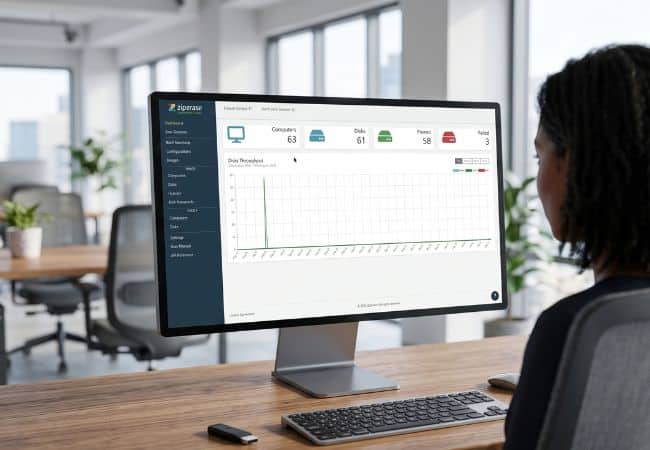
Erasure records stay with the job in the field and reach central storage once a connection is available.
- Offline Reporting: Reports save back to the USB drive at the end of each erasure.
- Portal Sync: A portal connection uploads them automatically to the Ziperase Customer Portal.
- When to Move: Move when devices can be cabled to an isolated LAN at a workbench or central site, where Command Center network-boots them, runs every erasure from a single screen and keeps licenses and reports on one server.
- Existing Reports: Reports saved by USB Erase upload into Ziperase Command Center, which integrates with the ITAD ERP platforms Makor ERP, RazorERP and IQ Reseller.
Ziperase USB Erase FAQs
Q: Do I need an internet connection to use Ziperase USB Erase?
A: No. USB Erase boots each device from a USB drive, takes its licenses from that drive and saves reports back to it, so erasure runs without a network connection.
Q: What kind of USB drive does Ziperase USB Erase need?
A: A standard off-the-shelf USB drive from 1GB to 2TB with a valid serial number. Ziperase Boot Media Creator formats the drive and installs the erasure software on it.
Q: Can one Ziperase USB Erase license erase more than one device?
A. No. USB Erase uses one license for each drive it erases, so a laptop with two drives uses two licenses.
Q: Which devices can Ziperase USB Erase wipe?
A: Laptops, desktops, servers and Intel Macs with a 64-bit Intel-compatible processor. It erases IDE, SATA, SAS, SCSI, NVMe and eMMC drives.
Q: Does Ziperase USB Erase work on Macs and Apple silicon?
A. USB Erase works on Intel Macs. For Apple silicon Macs, use Ziperase Device Link for Macs.
Q: Which erasure standards does Ziperase USB Erase meet?
A: USB Erase meets NIST SP 800-88 R2 and IEEE 2883:2022. It is certified to ADISA Product Assurance Level 5 and Common Criteria EAL2.
Q: Where do Ziperase USB Erase certificates go if the device is offline?
A: They save to the USB drive as PDF certificates and .json reports. With a portal connection they upload automatically to the Ziperase Customer Portal, and saved reports can also be uploaded to Ziperase Command Center.
Q: When should I use Ziperase USB Erase instead of Command Center?
A: Use USB Erase for standalone erasure where there is no network, such as on site or at a remote office. Command Center is for networked erasure, where devices connect over the network and licenses and reports are managed centrally.